
Stock Alert App Checklist: What Traders Should Verify Before Paying
A stock alert app checklist helps traders avoid paying for notifications that look useful but do not actually improve their workflow.
Mobile stock alerts can be helpful. They can notify users when a price level hits, news breaks, volume changes, or a watchlist condition triggers. But alerts can also create noise, urgency, and late reactions.
This article gives traders a practical checklist before paying for a stock alert app, stock scanner app, or trading notification app. It is not financial advice.
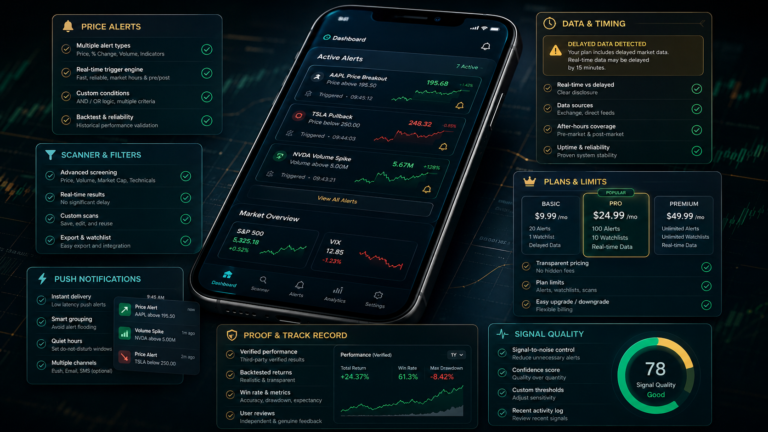
Stock Alert App Checklist: Quick Version
Before paying for a stock alert app, traders should check six things:
- what alert types are supported
- whether data is real-time or delayed
- how many alerts are included
- whether push, email, phone, or SMS alerts cost extra
- whether the app explains why an alert fired
- whether alerts are reminders, scanners, or trade-style signals
The best alert app is not the one with the most notifications. It is the one that helps the trader filter better.
What This Article Checks
This stock alert app checklist reviews:
- stock price alerts
- mobile stock alerts
- stock scanner app features
- trading notification app limits
- pricing clarity
- data delays
- alert noise
- proof claims
- whether alerts are actionable or only reminders
These checks matter because traders often confuse alerts with signals.
Check the Alert Type
Not all alerts are the same.
Common stock alert types include:
- price crosses above or below a level
- percentage move alerts
- volume alerts
- news alerts
- earnings alerts
- analyst rating alerts
- insider trading alerts
- screener alerts
- technical indicator alerts
A simple stock price alert is not a complete trade idea. It only says a condition happened.
Before paying, traders should check whether the app supports the exact alert types they need.
Check Real-Time Data and Delays
Real-time data matters for active traders.
If an alert is delayed, the stock may already have moved before the user receives the notification. That may not matter for investors, but it can matter a lot for day traders or short-term traders.
Before paying, readers should ask:
Is the data real-time?
Are quotes delayed on the free plan?
Do real-time alerts require a paid tier?
Are U.S. exchange data fees separate?
Does the app explain delay rules clearly?
An alert that arrives late can still be useful as a reminder, but traders should not treat delayed data like a live signal.
Check Pricing and Notification Limits
Many apps have limits that are easy to miss.
A plan may limit:
- number of active alerts
- push notifications
- email alerts
- phone-call alerts
- watchlists
- screener presets
- real-time data
- advanced filters
- export features
- device access
This is why pricing pages matter. A cheap plan may not include the features traders actually need.
Before paying, users should check monthly cost, annual cost, trial access, refund terms, cancellation rules, and whether alerts continue after the subscription ends.
Check Whether Alerts Are Signals or Reminders
A stock alert app may not be a signal app.
If a user sets an alert at $50 and receives a notification when the stock reaches $50, that is a reminder. It is not proof the stock should be bought or sold.
A stock scanner app may identify stocks that match filters. That is also not a complete signal.
A true signal-style tool should explain entry logic, risk, invalidation, target, and outcome tracking.
Traders should understand which category they are buying.
Check Whether the App Creates Noise
Alert noise is one of the biggest hidden problems.
A trader may begin with useful notifications but eventually receive too many alerts. This can lead to rushing, overtrading, or ignoring the original plan.
Before paying, traders should ask:
Can I pause alerts?
Can I group alerts by watchlist?
Can I filter by market cap, volume or price?
Can I stop duplicate alerts?
Can I review alert history later?
Can I disable low-value notifications?
A good app helps traders focus. A poor setup makes every notification feel urgent.
FAQ: Stock Alert App Checklist
What should I check before paying for a stock alert app?
Check alert types, real-time data, pricing, notification limits, refund terms, and whether alerts are signals or only reminders.
Are stock price alerts the same as stock signals?
No. Stock price alerts notify users when a condition is met. A stock signal usually includes a trade idea, entry, exit, risk level, and outcome tracking.
Do mobile stock alerts help traders?
They can help traders stay organized, but they can also create noise if the user receives too many alerts without a plan.
What is the biggest hidden limit in stock alert apps?
Common hidden limits include delayed data, active alert caps, premium notification types, and restricted scanner features.
Final Thoughts
A stock alert app checklist is useful because alerts can feel more actionable than they really are.
A notification is not always a signal. A scanner result is not always a trade. A price alert is not always an opportunity.
Before paying, traders should check alert types, timing, data delays, pricing, notification limits, and whether the app helps them make clearer decisions.
For more comparison-led articles, use the Stock Signal App Reviews page. If there is a stock alert app or trading notification app AISignalsBot should review, suggest it through the contact page.