
SignalStack Review: Alert Automation Before You Connect a Broker
This SignalStack review looks at what traders should check before using trading alert automation to connect alerts with broker order execution.
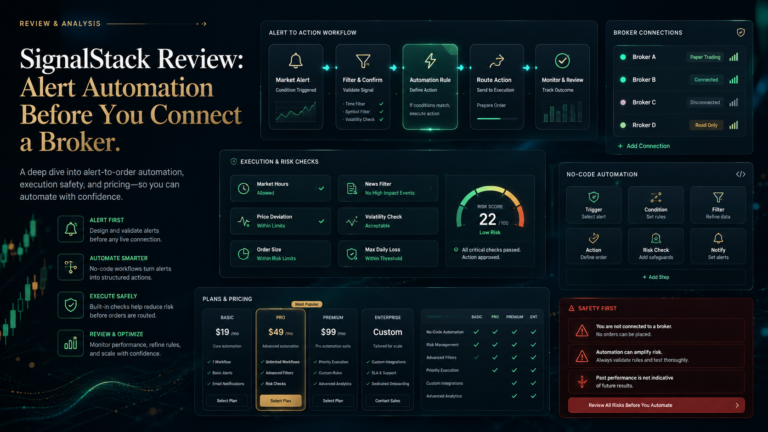
SignalStack appears to position itself as a no-code trading automation tool. Instead of manually placing every trade after an alert fires, traders can connect alerts from supported platforms and convert them into orders through connected broker or exchange accounts.
That sounds useful, especially for active traders who already use alerts.
But automation changes the risk.
A normal alert tells a trader to look at something. Automated trading alerts can move closer to execution. That means a bad alert, wrong setting, delayed signal, duplicate trigger, or misunderstood strategy can become a real order faster than the trader expects.
This article is not financial advice and it is not a recommendation to use or avoid SignalStack. The goal is to show what is publicly visible, what is unclear, and what traders should verify before connecting any broker or exchange account.
SignalStack Review: What Traders Should Check First
A SignalStack review should not only ask whether the tool can automate alerts.
The better question is:
Should this alert be automated at all?
Trading alert automation can save time, but it does not make a weak strategy stronger. If the original alert logic is bad, automation can only execute that bad logic faster.
Before using any no-code trading automation tool, traders should understand:
where the alert comes from
what condition triggers it
which broker receives the order
what order type is used
what happens if the alert repeats
whether position size is controlled
whether stop loss and take profit rules are included
how errors or failed orders are handled
Automation should improve discipline. It should not replace understanding.
What This Article Checks
This article checks SignalStack from a trader-protection and workflow perspective.
The main checks are:
alert source quality
broker order execution
pricing clarity
supported brokers and exchanges
risk controls
duplicate alert handling
whether alerts are live, simulated, or strategy-based
whether the user understands the trigger logic
whether the tool is automation software, not a signal provider
These checks matter because SignalStack is not mainly a signal-picking service. It is closer to an alert-to-order automation layer.
What SignalStack Appears to Offer
SignalStack appears to help traders turn alerts from trading platforms into live orders through connected broker or exchange accounts.
That can be useful for traders who already have a working alert system and want faster execution.
For example, a trader may have alerts from a charting platform, scanner, strategy tool, or custom condition. SignalStack can act as the bridge between that alert and the broker order.
This places SignalStack in a different category from Telegram signal groups, AI signal dashboards, or stock alert apps.
It is not mainly telling traders what to trade.
It is helping automate what happens after an alert fires.
That difference matters.
Why Alert Automation Is Not the Same as Signal Quality
One of the biggest mistakes traders can make is confusing automation with edge.
Automation is not proof.
Fast execution is not proof.
A connected broker is not proof.
A no-code workflow is not proof.
If the alert logic is weak, automation will not fix it.
Traders should test the alert source first. They should understand whether the original alert has a strong history, whether it fails often, whether it triggers late, and whether it works across different market conditions.
Before automating, traders should ask:
Would I take this alert manually?
Do I understand why it triggers?
Do I know the expected risk?
Have I tested it on paper or with small size?
Can I stop the automation quickly?
If the answer is unclear, the trader should slow down.
Broker Order Execution: The Biggest Check
The biggest check in any SignalStack review is broker order execution.
Once a tool can send orders, the trader must think about operational risk.
Important questions include:
What broker or exchange is connected?
What order type is sent?
Is the order market, limit, stop, or bracket-style?
What happens during fast markets?
What happens if there is slippage?
What happens if the broker rejects the order?
Can duplicate alerts create duplicate trades?
Can the trader pause or kill the automation?
Are position size and risk limits controlled?
A signal mistake is one problem. An execution mistake is another.
When automation is involved, both matter.
Who SignalStack May Fit
SignalStack may fit traders who already have alert workflows and want to automate part of their execution process.
It may appeal to users who:
already use chart alerts
already use scanner alerts
understand order types
trade with clear rules
want no-code trading automation
need faster alert-to-order routing
know how to manage position size and risk
It may not fit traders who are looking for a signal provider, AI prediction tool, beginner app, or service that tells them what to buy and sell.
A trader who does not understand alerts, order types, risk controls, or broker execution should be careful before connecting automation to a live account.
Red Flags to Verify Before Connecting a Broker
Before using SignalStack or any trading alert automation tool, traders should check these areas.
1. Alert Logic
Does the trader understand exactly what triggers the alert?
2. Duplicate Alerts
Can the same alert fire more than once and create unwanted orders?
3. Position Size
Is position sizing controlled before the alert reaches the broker?
4. Order Type
Does the trader know whether the order is market, limit, stop, or another type?
5. Stop Loss and Take Profit
Are protective rules included, or does the tool only send the entry?
6. Broker Compatibility
Is the broker or exchange supported, and are there any account restrictions?
7. Manual Override
Can the trader quickly pause, cancel, or disable automation if something goes wrong?
If these answers are unclear, automation may be too risky for the trader’s current workflow.
FAQ: SignalStack Review
What is SignalStack?
SignalStack appears to be a no-code trading automation tool that helps convert trading platform alerts into broker or exchange orders.
Is SignalStack a signal provider?
SignalStack is better understood as an alert automation and order-routing tool, not a signal provider. The quality of the trade depends on the original alert or strategy.
Is trading alert automation safe?
Trading alert automation can reduce manual delay, but it also adds execution risk. Traders should understand order types, position sizing, duplicate alerts, slippage, and manual override controls.
What should traders check before using SignalStack?
Traders should check broker compatibility, alert logic, order type, risk controls, pricing, duplicate alert behavior, and whether the strategy has been tested before live use.
Can SignalStack improve a weak strategy?
No. Automation can execute a strategy faster, but it does not make a weak alert or poor strategy reliable.
Final Thoughts
SignalStack is interesting because it sits in a different part of the trading-tool market.
It is not mainly a Telegram signal group.
It is not mainly an AI stock scanner.
It is not mainly a market research app.
It is closer to a trading alert automation and broker order execution layer.
That can be useful for traders with clear alert rules and strong execution discipline. It can also be risky for traders who do not fully understand their alerts, order types, position sizing, or broker connection.
The honest standard is simple:
Do not automate an alert you would not trust manually.
Before connecting any live broker or exchange account, traders should check the alert source, execution rules, risk controls, duplicate trigger behavior, pricing, and manual override options.
If SignalStack or another provider believes any information is outdated or incomplete, they can contact AISignalsBot with public proof, updated terms, or a reviewable product update.
For more comparison-led articles, use the Market Insights & Trading Signal Guides hub. If there is an automation tool, signal app, broker tool, or trading platform AISignalsBot should review, suggest it through the contact page.