
Best Stock Signal App for Beginners: Alerts, AI Claims and Proof Checks
The best stock signal app for beginners is not always the app with the loudest alerts or the most advanced AI language. Beginners usually need the opposite: clear alerts, simple explanations, visible pricing, and enough proof to understand what they are following.
A stock signal app can help a new trader build a watchlist, receive price alerts, monitor news, or follow AI stock alerts. But it can also create pressure to react to every notification.
This article explains what beginners should check before paying for stock signal software. It is not financial advice and it does not recommend any specific trade.
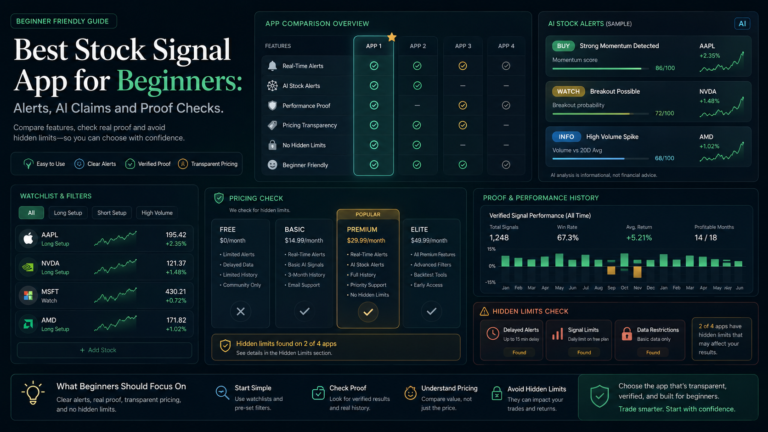
Best Stock Signal App for Beginners: What to Check First
The first beginner question should be simple: does this app make the market easier to understand?
If the app sends dozens of alerts without explaining why they matter, it may create more confusion. If the app clearly separates watchlist alerts, price alerts, research updates, and trade ideas, it may be easier to review.
Beginners should not pay for a tool only because it says AI. They should check what the app actually does.
What This Article Checks
This article checks beginner stock alert tools from a practical review angle.
The main checks are:
- beginner stock alerts
- AI stock alerts
- stock signal software
- stock trading alerts
- pricing clarity
- alert limits
- proof history
- whether losses or failed ideas are visible
- whether the app is a signal service, scanner, research tool, or notification app
These checks help beginners avoid paying for software they cannot use properly.
Beginner Stock Alerts Should Be Simple, Not Noisy
A beginner-friendly stock alert app should help users track specific events, not push them toward constant trading.
Useful beginner alerts may include:
- price above or below a level
- large price change
- earnings date reminders
- news alerts
- watchlist changes
- screener alerts
- portfolio update alerts
These can help users stay organized. But alerts become risky when they feel like direct instructions without context.
Before paying, beginners should ask: can I control the number and type of alerts?
AI Stock Alerts Need Clear Explanations
AI stock alerts can sound impressive, but beginners should ask what the AI is actually doing.
Is it ranking stocks? Scanning patterns? Summarizing news? Detecting price changes? Sending trade ideas? Watching a portfolio?
An AI label is not enough. The app should explain why an alert fired and what data supports it.
A useful AI stock alert should make the idea easier to review. It should not hide behind vague language like smart, predictive, or high accuracy without showing the logic.
Stock Signal Software vs Stock Research Apps
Beginners often confuse stock signal software with stock research apps.
A signal app may send trade-style alerts.
A stock alert app may send notifications.
A screener may help users filter stocks.
A research platform may provide valuation, financial health, analyst data, or portfolio alerts.
For example, Stock Alarm is closer to a notification and alert app. FINVIZ is better known for screening and market research. Simply Wall St is more research and portfolio-analysis focused. Moomoo includes trading-platform alerts and market tools.
Those are different workflows.
The best stock signal app for beginners depends on whether the user wants simple alerts, research, scanners, or direct trade ideas.
Pricing, Trials and Hidden Limits
Beginners should check pricing before getting attached to a platform.
Important questions include:
- Is there a free plan or trial?
- Are real-time alerts included?
- Are push, email, or phone alerts limited?
- Are screener alerts locked behind paid plans?
- Is data delayed?
- Can the user cancel easily?
- Are annual plans cheaper but harder to refund?
- Does the app explain what each plan includes?
Hidden limits matter because beginners may sign up for a cheap plan and then discover the useful features are locked behind a higher tier.
Beginner-Friendly Tools to Compare
Beginners may compare several types of tools depending on their goal.
Stock Alarm may fit users who mostly want mobile notifications and price alerts.
FINVIZ may fit users who want a screener and market research interface.
Simply Wall St may fit users who want visual company research, portfolio updates, and stock discovery tools.
Moomoo may fit users who want platform alerts inside a brokerage-style trading app.
BotPredictAI may be relevant for users comparing AI signal dashboards and reviewable signal histories, but it is a different category from a simple beginner stock alert app.
The point is not to use all of them. The point is to understand the category before paying.
FAQ: Best Stock Signal App for Beginners
What is the best stock signal app for beginners?
The best fit depends on whether the beginner wants price alerts, AI stock alerts, research, scanners, or a signal dashboard. The app should be simple, controllable, and clear about pricing.
Should beginners trust AI stock alerts?
Beginners should treat AI stock alerts as research prompts, not guaranteed signals. They should check how the alert is generated and whether past alerts can be reviewed.
What is the biggest mistake beginners make with stock alert apps?
The biggest mistake is reacting to every alert without a plan. More notifications do not automatically mean better decisions.
Are free stock signal apps enough?
Free tools can be useful for basic alerts or research, but users should check delays, alert limits, data quality, and whether advanced features require payment.
Final Thoughts
The best stock signal app for beginners should make the market easier to follow, not more stressful.
Beginners should look for clear alerts, transparent pricing, useful explanations, and enough proof to understand what they are seeing. They should avoid apps that make AI claims without showing how alerts are generated or whether past signals can be reviewed.
A good beginner tool creates clarity. A poor fit creates noise.
For more comparison-led articles, use the Stock Signal App Reviews page and the Market Insights & Trading Signal Guides hub. If there is a beginner-friendly stock app AISignalsBot should review, suggest it through the contact page.